Sunday, December 3, 2006

Tutorial #2: Tweak the AdSense BG Color!!!

Hello and welcome to this new tutorial!

Tutorial Explanation:

I will show how in a few simple steps, you can change your AdSense Background colors, to suit any part of your site!

Needed Tools:

- An AdSense Account.
- Adobe Photoshop.


OK! Lets Begin!

Step Number one:

- Open Photoshop.
- Open your website in your browser.
- Press the Print Screen (PrtScn) button, on your keyboard.
- Open a new document in PhotoShop (CTR+N). (settings don't matter..)
- Paste the printed screen into Photoshop. (Simply press CTR+V)


Step Number Two:

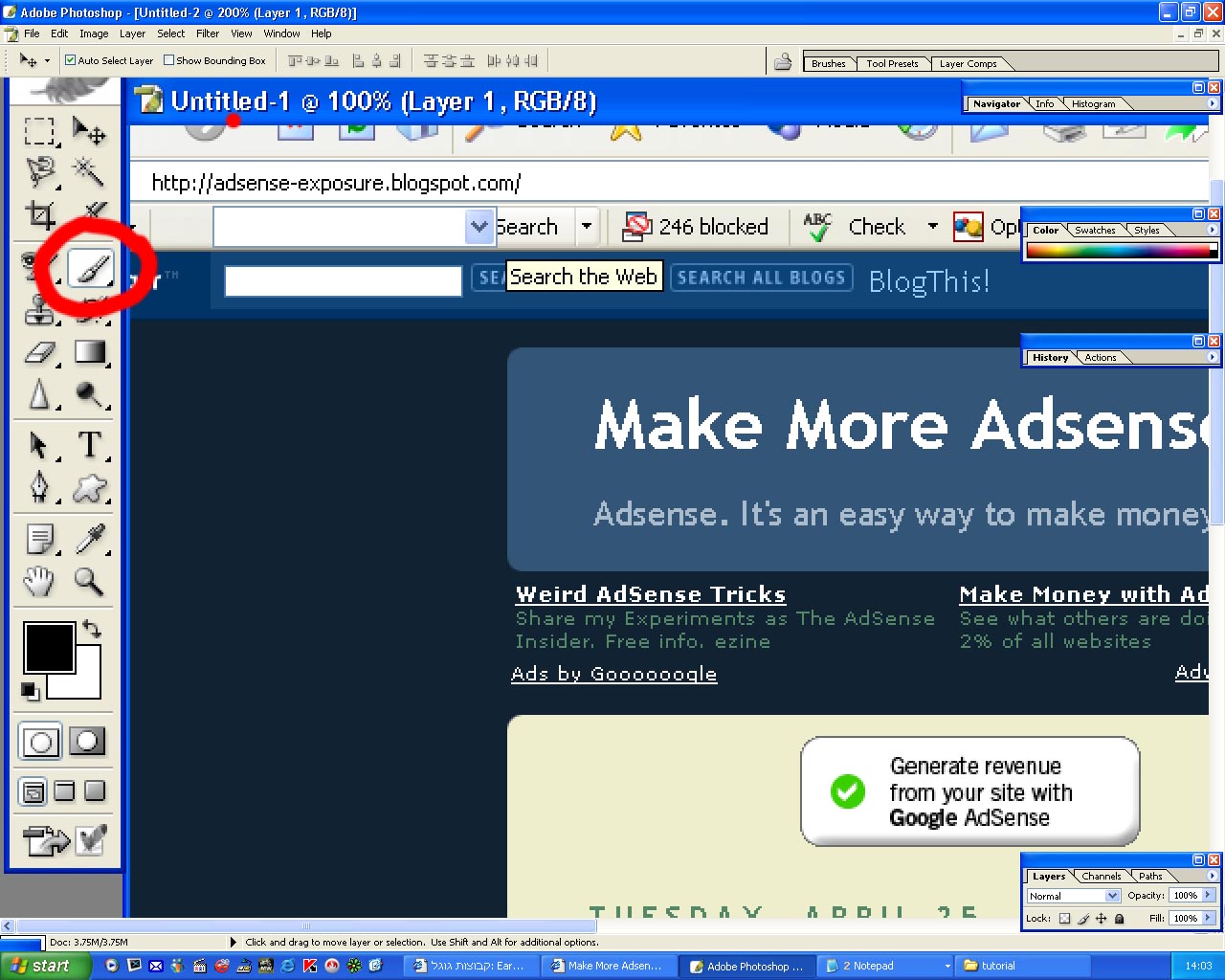
- Click on the Brush tool in Photoshop.


Step number Three:

- Hold down the ALT button, on your keyboard.


Step number Four:

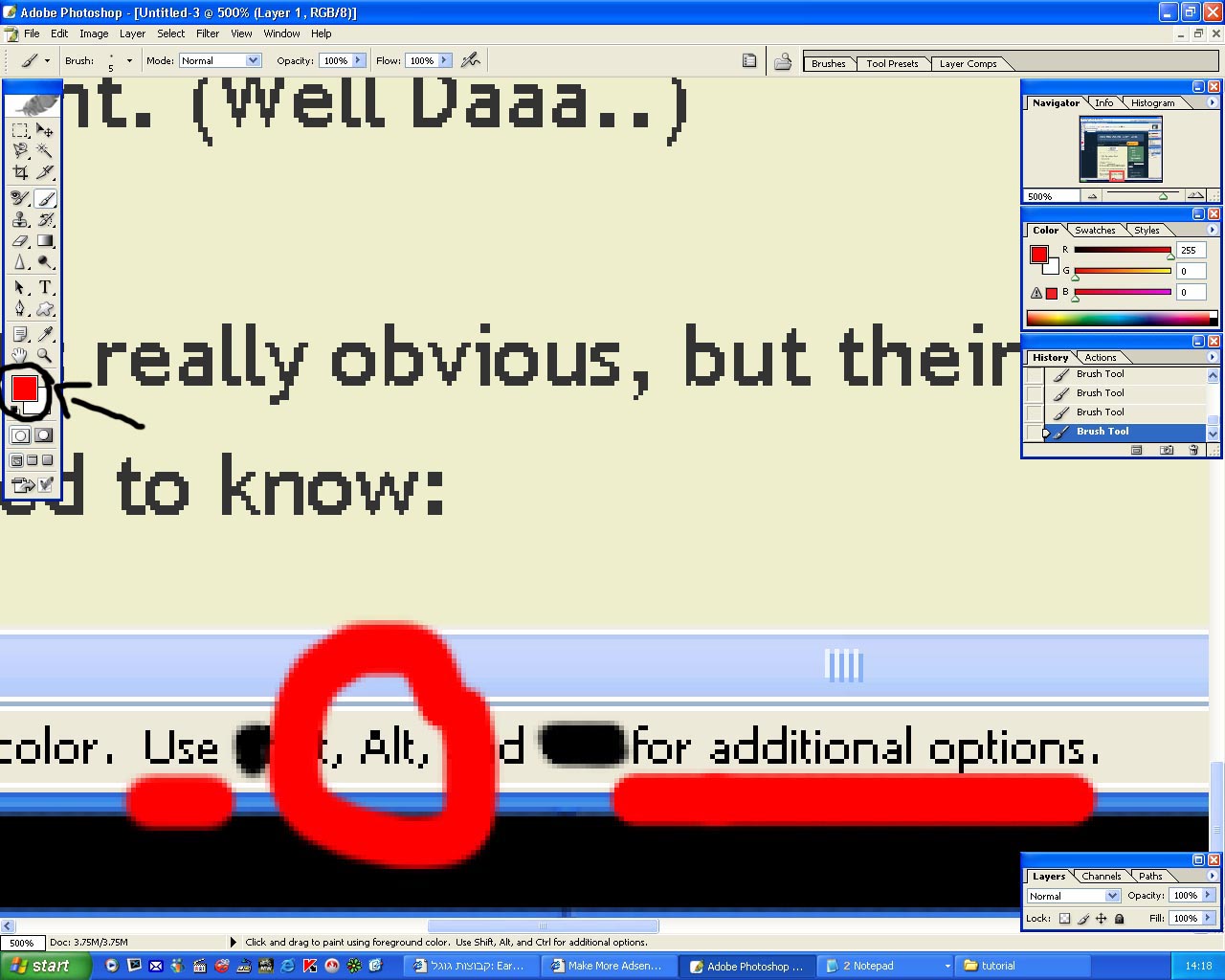
- While holding down the ALT button, select and click with your mouse, the color you want your Ad to be.

- After choosing the color, Click on the color palate. (The colored box in the picture)

src="http://photos1.blogger.com/blogger/2871/2729/320/4alt%20click.jpg" border="0">

Step number Five:

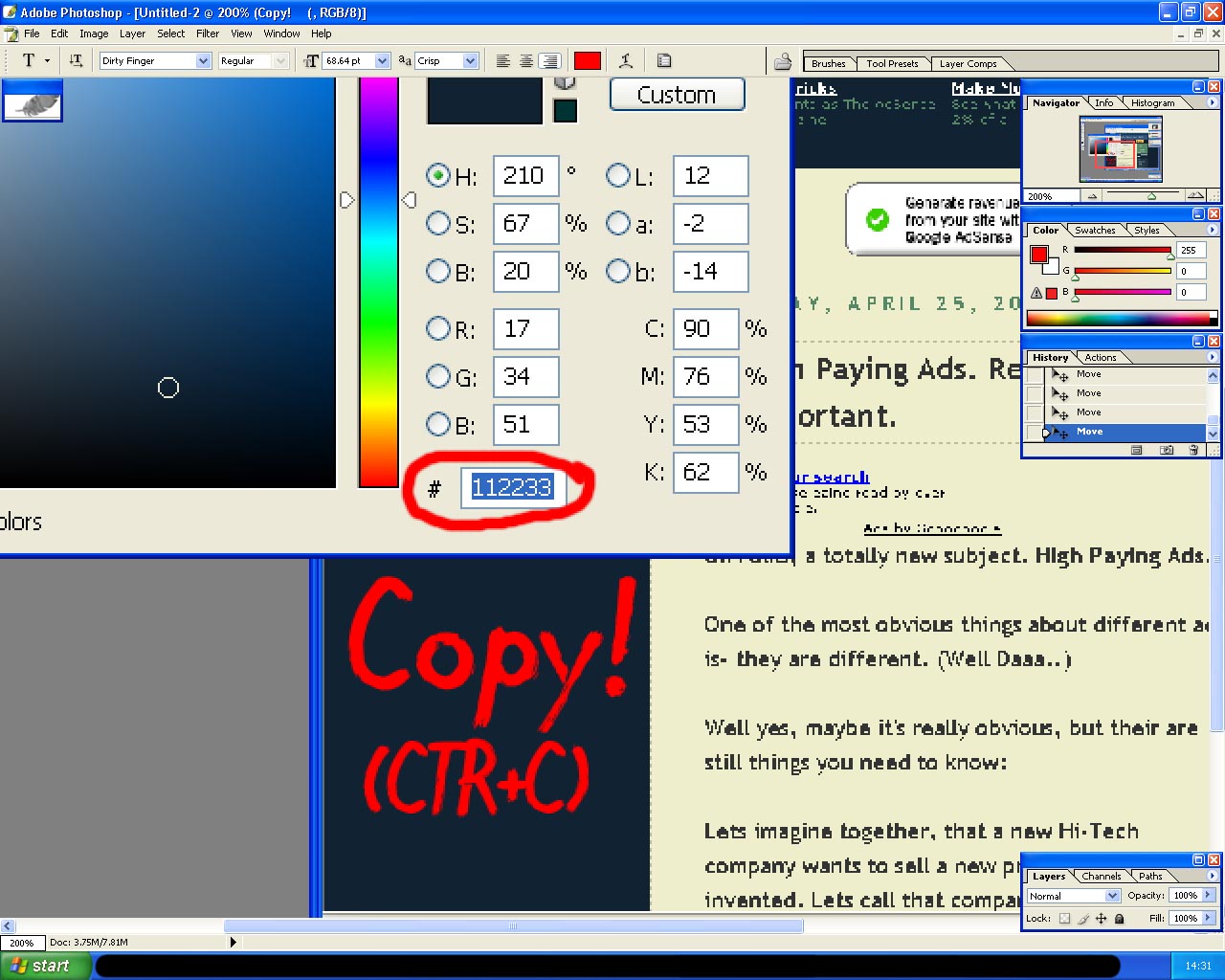
- You should now be in the Color Setting. (Like in the picture)

- Copy the content of the box I marked in the picture. (Simply select it, and press CTR+C)


Step number Six:

- Go into your AdSense Account.
- Go into the AdSense Setup page, and select the AdSense for content (or Search..)
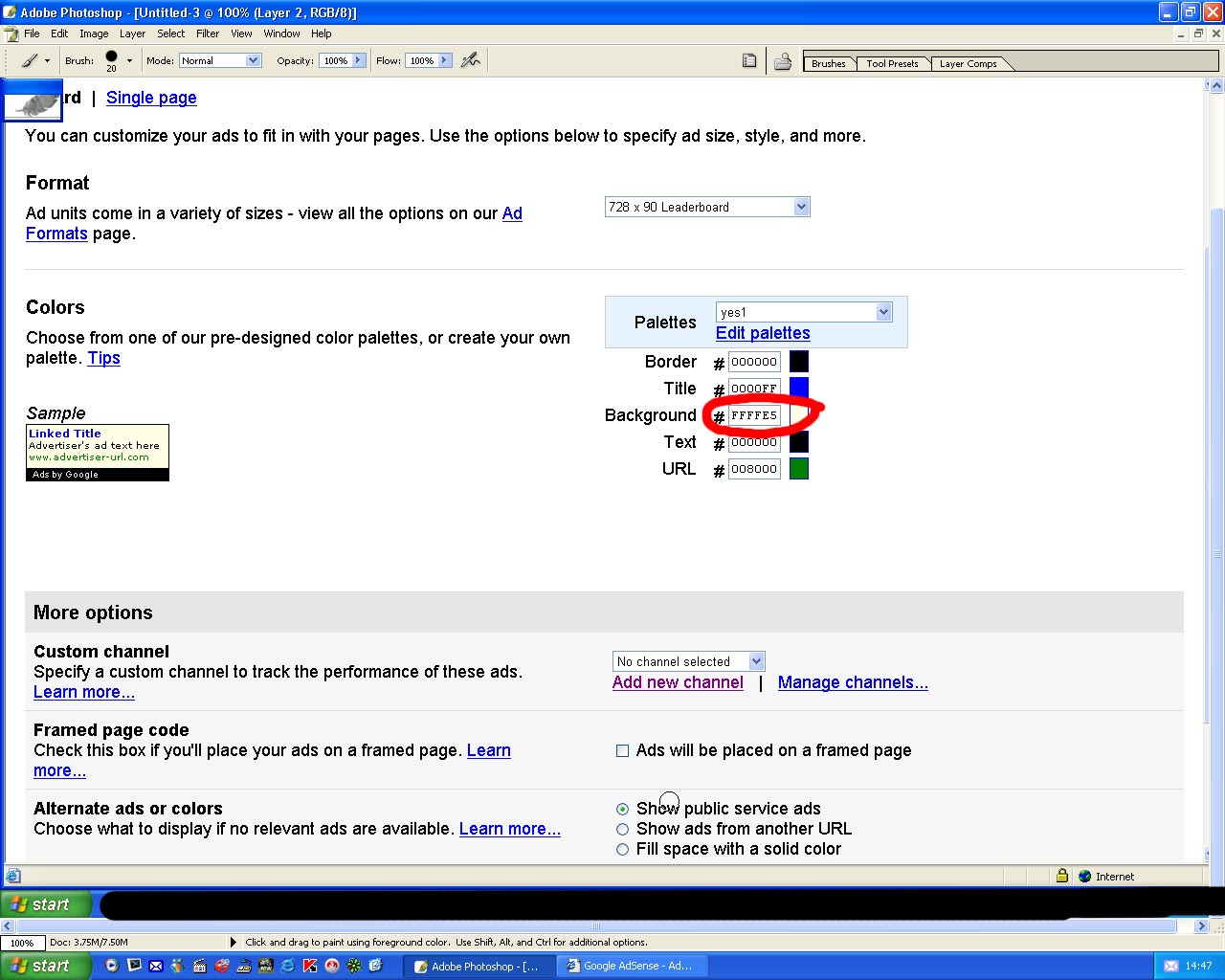
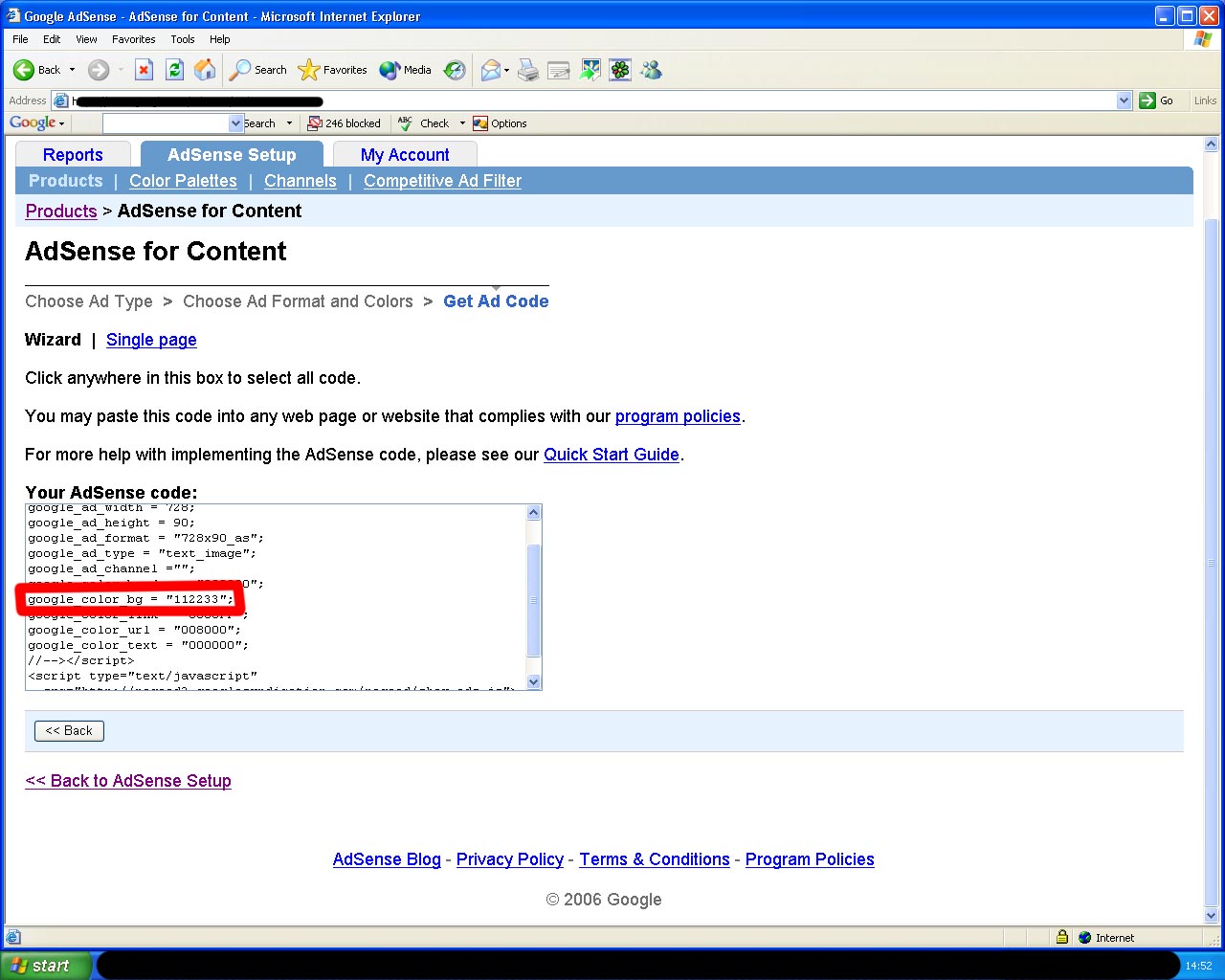
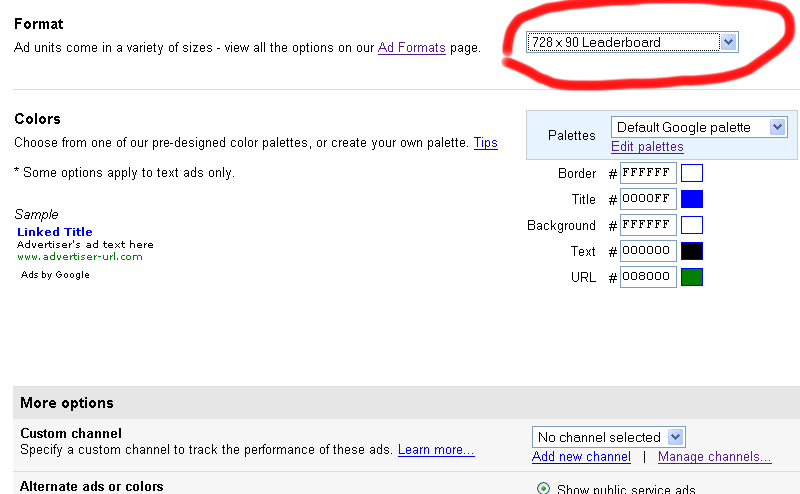
- Choose the settings you like for the Ad, and finally, get to the Ad color settings. (it should look like the picture..)
- Select the content of the Background box.


Step number Seven:

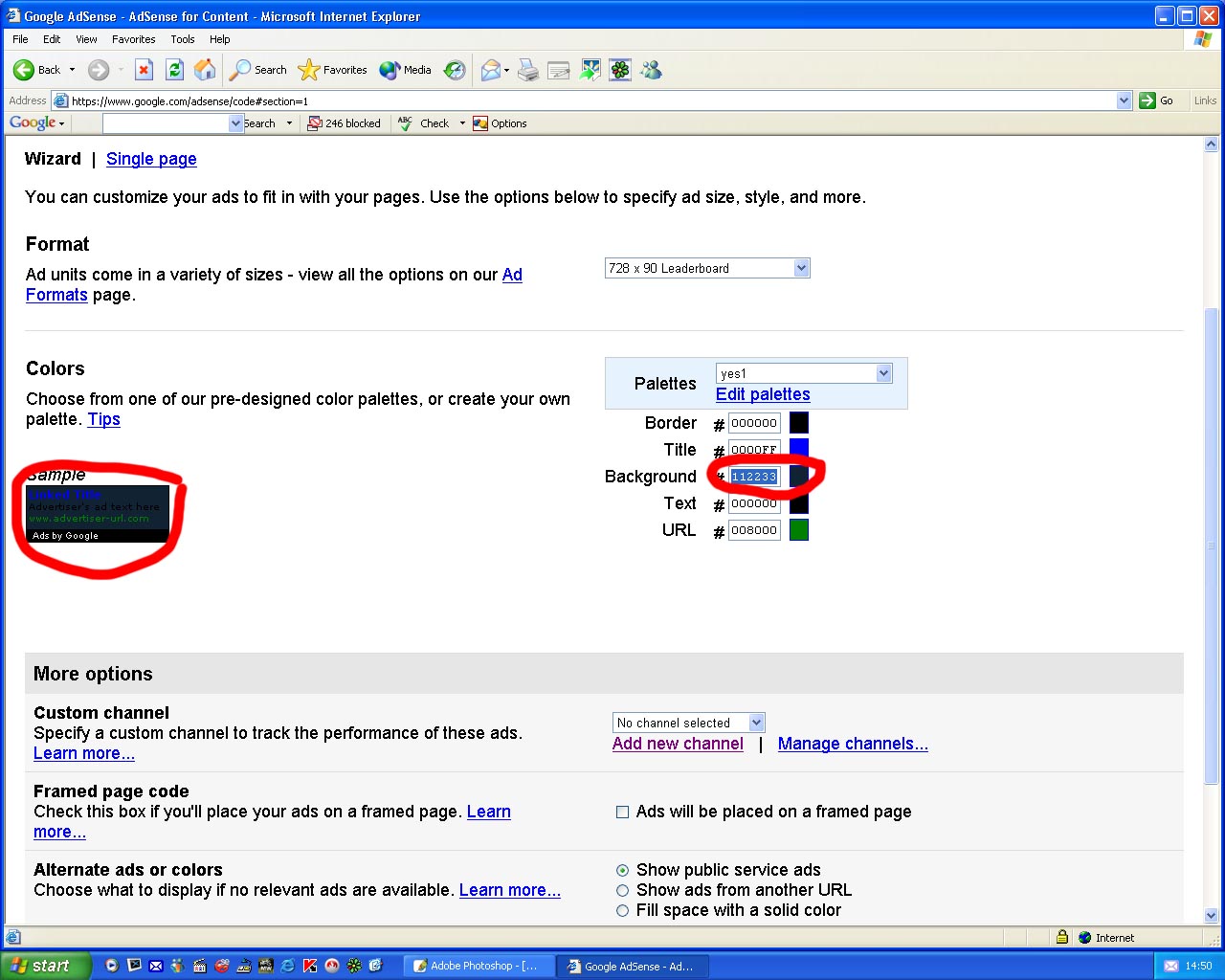
remember that when we were in Photoshop, we copied something? Now is the time to use it.

- Paste the content into the Background box. (Notice the ads background change.)


Step Number Eight:

- Simply copy the ads code, into the place you want it, in your website. (Like you always do..)


That's it. Hope it helped you out! I tried to make it as easy as possible!

Tutorial #3, AdSense Referral Setup.

Hello and Welcome back!

This tutorial is a direct continuation of the referral articles in the AdSense Exposure blog.

If you haven't yet read them, please do so before you start this tutorial.
1. How To Profit From Google Referrals
2. How To Boost Your Referral Success

Tutorial explanation:

In this tutorial we will learn the basics of the AdSense referral setup.

What do you need?

An AdSense account.

Step Number One:

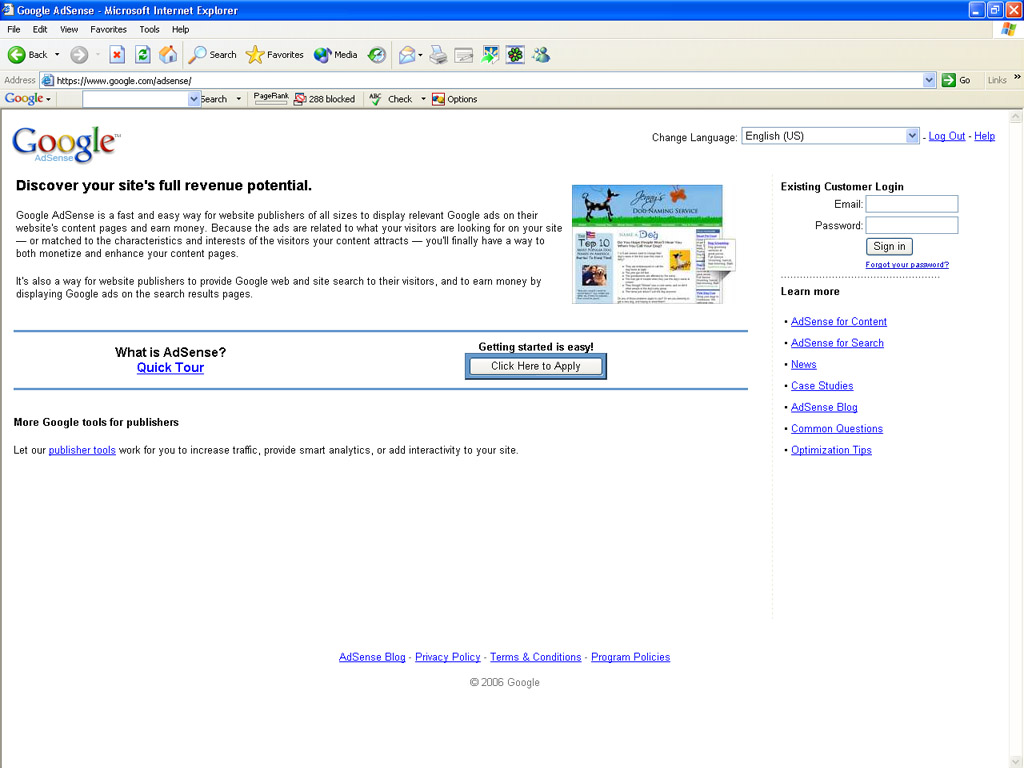
- Login to your AdSense account.


Step Number Two:

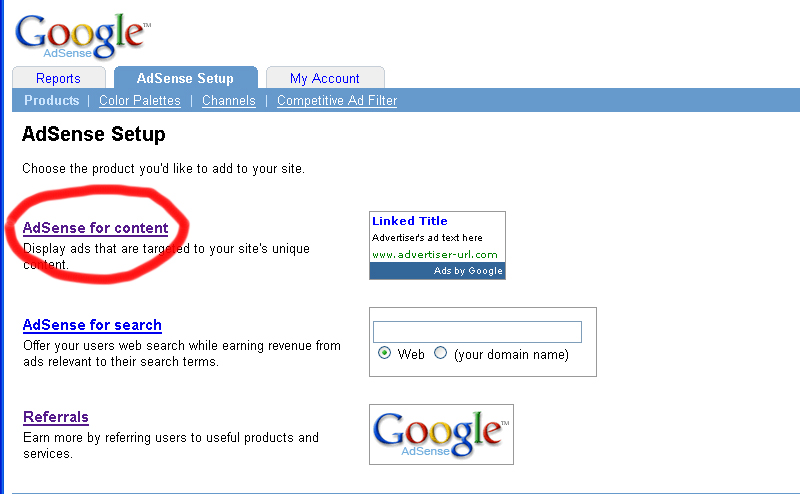
- Go to the 'AdSense Setup' tab.
- Select referrals.
href="http://photos1.blogger.com/blogger/2871/2729/1600/Adsense%20Setup.2.jpg">

Step Number Three:

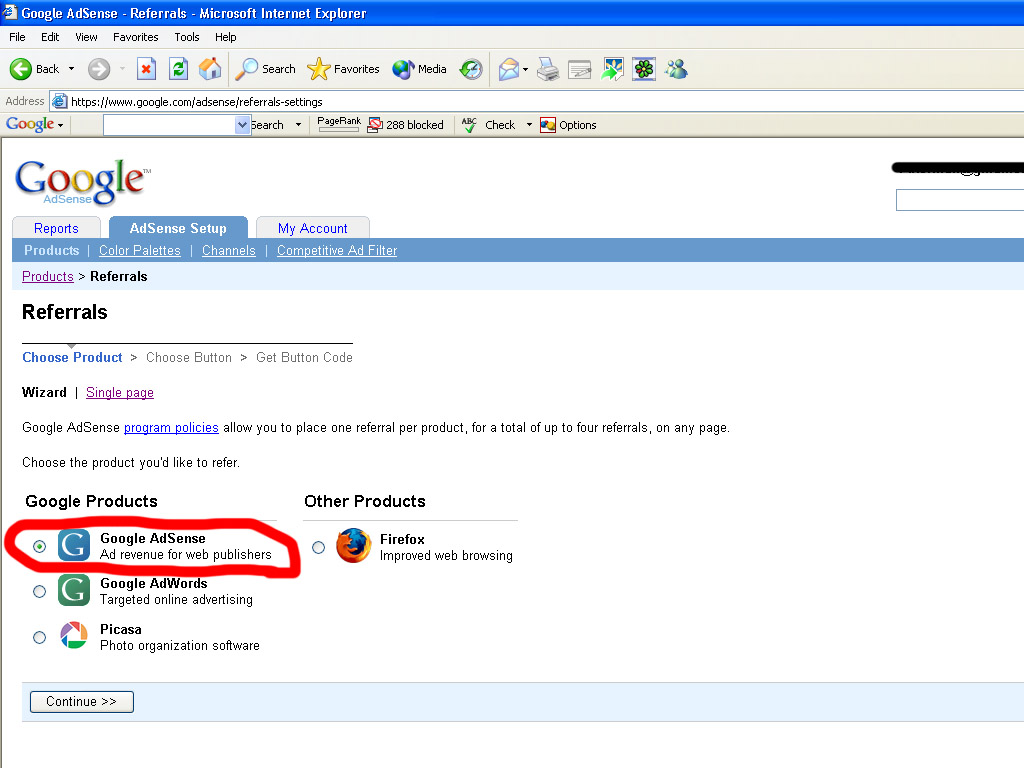
- Choose the product you want to refer to.
(In this tutorial we will refer to Google AdSense)
- Click Continue.


Step Number Four:

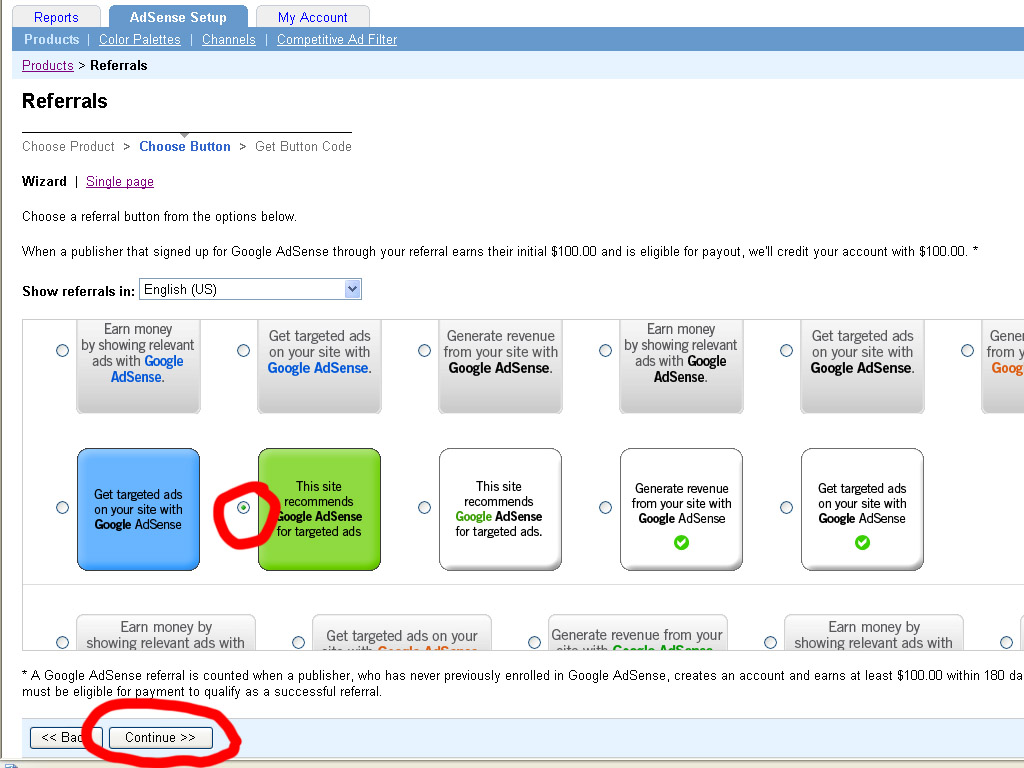
- Choose the referral button or link you want.
- Click Continue.


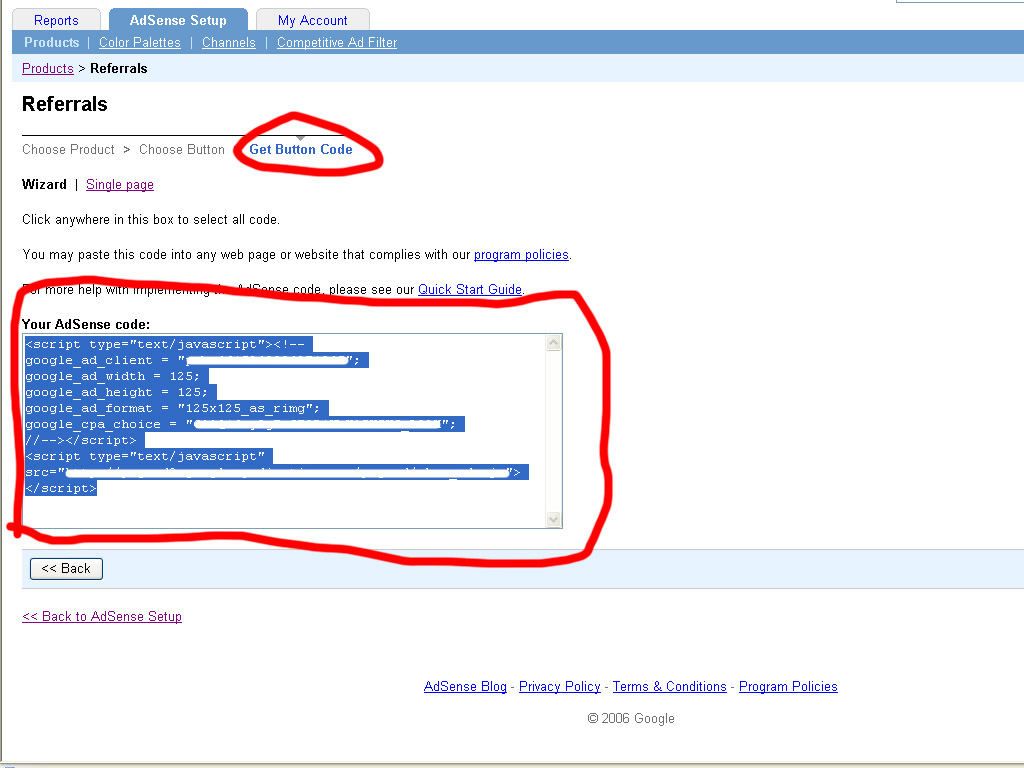
Step Number Five:

- Click inside the code box to highlight it.
- Copy Paste the code into the place you want it to be on your site.


That's it. Wasn't that simple??

Hope I could help.

Tutorial #4: Setting Multiple Adsense color palettes!

Tutorial explanation:

This tutorial will explain how to generate code for multiple color palettes for 1 certain ad.

What do you need?

An Adsense account.

Step Number One:

login and go to the AdSense for content setting.


Step Number Two:

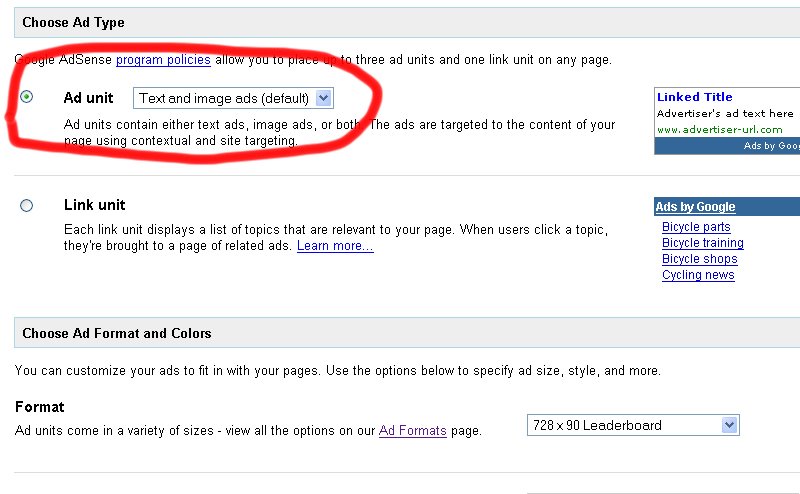
Select Ad unit- text and image ads (default). (it actually doesn't matter if what you choose there..)


Step Number Three:


Select an Ad format. It doesn't matter which one..


Step Number Four:


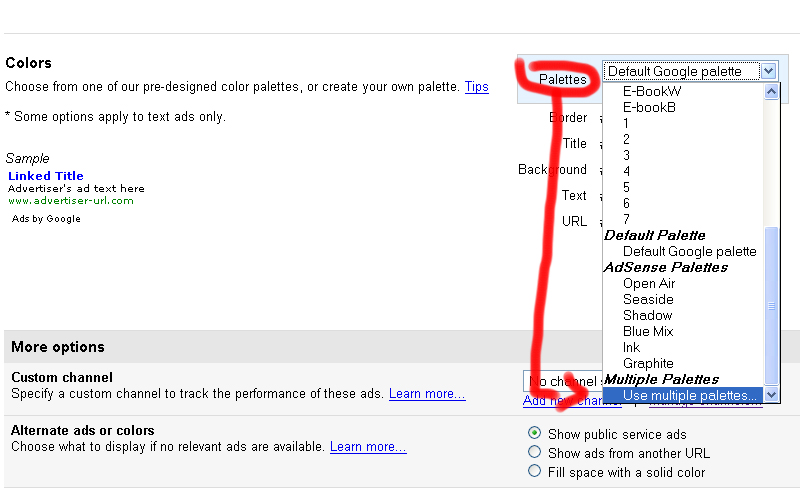
In the color palate, choose 'use multiple
palettes normal;">'.


Step Number Five:

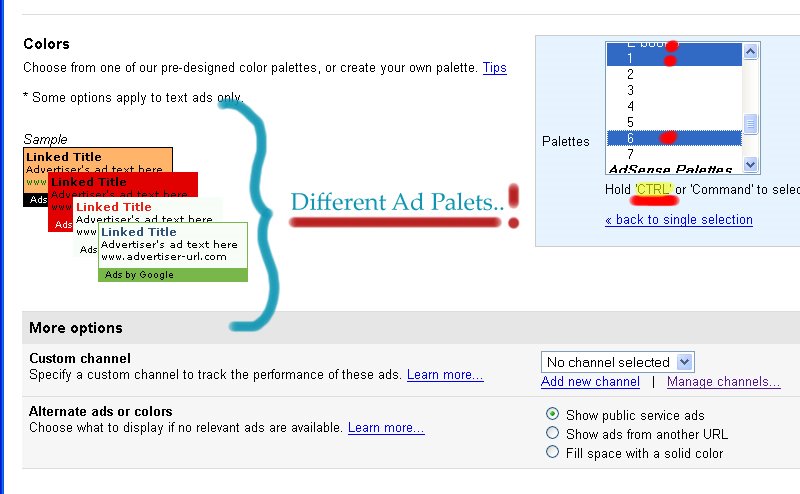
Select by holding down the 'ctrl button, the
palettes you want to use. (you get a preview of 4 different palettes, on the left. If you select more than 4 different palettes, it will still work, but you won't see them all in the preview.)


Step Number
Six:

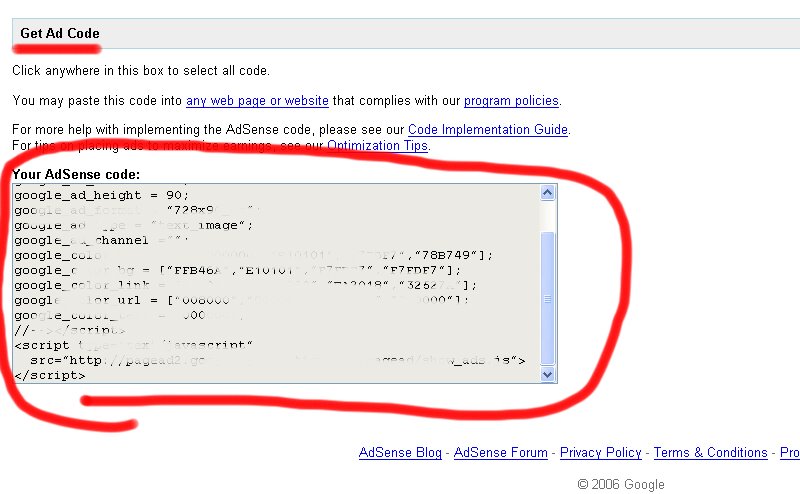
Copy and paste your code into the suitable place.


And that rounds up this tutorial!
Hope it helped you out.

Google gives out secret trick to Improve CTR!!

One of the best tricks to improve your CTR (click threw rate), is to constantly make changes to your ads.

I don't know how many of you even know about the option you have in your Adsense account, to select multiple color palettes, for 1 Adsense ad.

What does this option do, how does it work, and why should I use it?

It's very simple. Instead of you manually changing the way your ad looks every now and then, you can set it to be automatic, so it changes constantly with out you needing to do a thing.

You'll have to ask Google exactly how it works.. But what I know is that it simply modifies the code which is generated, to have the option of changing the color palette.

Why should you use it?! That's a good one..
Ok Ok.. I'll explain..

Assuming your site has visitors who come back to your site, or even if you don't, and most of your visitors are first timers and will never come back again, it is good to have a variety of ads. Different ad colors attract different people, and it is good to mix and change constantly.
People who come back to a site they have visited before, will suddenly notice a slight change in your site, and then they will look for the change, and see the different ad. Which means they got attracted to the ad (which is good).

Now, since I know you'd love to have a screen shot tutorial of this terribly complicated process, I have created one.. I made it extremely easy to follow so you'll all be happy.
That's the end of this tip/trick..
I know you liked it, but I still like to hear comments..!

How to Increase AdSense CTR in Ten Easy Steps

As an AdSense Webmaster, you can monitor your CTR and your site traffic to determine how and where your ads are most effective. Maximizing your success with AdSense will be experimentation and trial and error, but there are some things you can do from the start to help your CTR along.

1) Ad Placement

Many websites try to hide the fact they have ads. They put them at the bottom of the page or only have one or two that are so small, the rest of the page distracts from them. While it's okay not to want to bombard your visitors with a site of ads, those ads are also a crucial part of keeping your business functioning. If magazines tried to bury their ads under all the content, they wouldn't be in business for very long, would they? Your site should be the same way. Place ads where they can easily be viewed and where they're visible to your visitors.

2) Ad Text Color

The text color of your ads should match the text color of your site. If you use bright blue for headlines on your site, use that for your AdSense headlines as well. This makes it appear as if the ads are part of the content.

3)Page Content

Choose a broad niche for your site, then break it down into smaller niches. Those smaller niches go on separate pages. This is also site organization and will help you place better-targeted ads. For example, if you have a computer site, break it down into sub niches: repairing computers, new computers, used computers, software, etc.

If you lump things together on one page and don't organize, you'll find that your CTR will be lower because your content is unorganized and scattered; therefore, your ads aren't as helpful to the visitor as you may think.

4) Don't Label Them as Ads

Don't label them as ads or sites sponsors. Although these are the only two terms allowed by Google, there's no need to point out that these are ads. It will just prevent them from blending in with the content of your site. Since the ads are targeted, if you allow them to, they will appear to be additional information on what your visitors are already interested in. Don't put a sign there letting them know they're wrong and it is, indeed, a "dreadful" ad.

5) Ad Appearance

Take away the border and background colors of your AdSense ads. These make them stand out as ads rather than information your visitors will be interested in. As said earlier, your ads should blend into the page. By making them appear as information you're providing, you're giving them another point of interest rather than an ad that many people might shy away from.

6) Expand Your Site

Expanding your site and adding pages should go hand in hand. However, expanding your site could just mean adding and refining content. It's important that you add pages with quality content as well. This increases your search engine ranking and gives more pages for AdSense ads.

7) Move the Ads

Sometimes return visitors only see what's new or what's changed. Move your ads from time to time, especially if you notice your CTR dropping. More often than not, you'll see an increase again as those same return visitors notice something in a different place and actually start to click through the same ads they didn't "see" last week.

8) Ad Format

Wider ads appeal to more visitors because they're easier to read. If something is easy to read, someone is more likely to take the time to read everything rather than just glancing at the first few words. However, it's important to balance your ads and the content on your pages. You'll discover that the way you think the ads should be for optimal CTR aren't always where they need to be. Monitor your ad placement versus CTR and you'll find the place and format that works best on each page.

9) Don't Chase the Million Dollar Keywords

Don't try to compete with the experts for the $100 keyword. It may work from time to time, but you'll have more success with mid-range keywords, and less competition too. By using mid-range keywords, you are more likely to achieve success over the long term. Remember that success in driving targeted traffic to your site by being ranked high in the search engines will increase your CTR with AdSense.

10) Use Text Ads, not Image Ads

By far, more webmasters have had success with text ads and not image ads. They look more like part of the document and are more appealing to visitors. Feel free to experiment with both, but text ads blend into your site better and result in higher CTR.

When trying any new method of using AdSense or new placements, be sure to monitor and track the results. After all, you're experimenting to see what brings you the highest CTR. By documenting your results, you'll know what makes the most money for you and you'll become one of the AdSense Webmaster gurus in no time at all.
How much money can you make with Google Adsense?

If you're looking at Google's AdSense program you're surely asking yourself how much you could make from such a program, and you probably think you can't make as much as you can from traditional advertising schemes.

Google, of course, keeps a great deal of secrecy regarding how much AdWords advertisers pay per each click directed to their site and the same applies for how much AdSense banner holders make from their websites.

While there's nothing official, rumors circulate around the Internet concerning the amount of cash a website can earn by using AdSense. And many people (illegally) disclose how much they have been making with AdSense. There are stories of people raising over one thousand dollars per month using AdSense.

There are also stories of people exceeding $100,000.00 per month but it's a bit hard to believe such stories. The truth to the matter is that if you have a small website and you just want it to support itself, and don't wish to reach your pocket for its maintenance costs you can probably do this with AdSense.

AdSense is also very good for people who host a lot of pages. Even if the said pages don't generate a lot of traffic individually, every click counts and you can earn up with a lot of money by doing this. And that just goes to prove that sometimes quantity matters nearly as much as quality.

There's no telling how much money you're going to make by using Google's AdSense but you can sort of tell for yourself, before actually starting, by taking a few things into consideration.

First, is the amount of visits you get every day. While there's no way to estimate precisely on this, you can generally make a safe assumption that if you have a lot of clicks per day you'll be making good money.

Also, this depends on what exactly your site is about. If your site is about anything popular (music, sex, whatever) you're bound to get a lot of banner clicks. These have a coefficient associated with them, called the CTR (click through ratio).

Basically, what it translates to is that if a large proportion of your site's visitors click the ads you'll be making more money. And the best way to do this is to have some popular content in your site, ensuring the links direct users towards popular items as well.

Then of course, there's the position and number of ads on your website. While you don't want to overdo it, having many links will undoubtedly generate more income for you as a webmaster. Do not however believe, that if you just add a lot of ads in an important portion of your site, visitors could always just skip them (and be assured that many do just that).

There's something between an art and a science to positioning your ads. People generally look in certain places and never look in others, and knowing this a website author and/or webmaster can do a great deal of things to increase his earnings with AdSense.

All in all, the amount of money you make with AdSense depends on many factors. But if you have a site with interesting contents and/or many pages, and if you see a constantly large amount of traffic every day, you can bet you'll be making a lot of money with AdSense.

Even if you aren't in the above categories, AdSense is still worth using because there's very little hassle in setting it up, and many times it can help financially support the site, whilst being a nice bonus to get through the post at the end of the month.

You need to have optimized niche website templates for best results. You may find the best adsense templates and blog templates at www.AdsenseTemplates.com (http://www.adsensetemplates.com). They are offering 100 fresh new templates every month.